A/B testing turns opinion into evidence. The app stores let you learn which message, visual, and flow convert real people into first-time downloads and do it in a way you can scale. On iOS, you have two levers: Product Page Optimization (PPO) to test your default product page with organic visitors, and Custom Product Pages (CPPs) to build intent-specific pages you connect to Apple Search Ads.
On Android, Google Play Store Listing Experiments give you similar control over your main or custom listings. When used together, these tools create a tight loop: you discover what works for broad traffic, tailor it to paid intent, and feed the best ideas back into your core page.
Before we dive in, a short glossary so we speak the same language. CVR is the conversion from store views to first-time downloads. TTR is taps per impression in Apple Search Ads. CPA is the cost per acquisition (install). MDE is the smallest effect size worth detecting. Alpha (α) is your false-positive risk (commonly 5%). Power is the chance of detecting a real effect (target 80–90%).
Where To Start and Why
Begin with PPO (or Play Experiments) to harden your universal story: the icon, the first screenshot narrative, the headline, and the preview's opening seconds. These assets meet every visitor, paid or organic, so small wins compound everywhere. Next, move to CPPs to express intent-specific stories.
Someone searching "budget planner" should land on visuals and copy about automatic categorization and monthly budgets. Someone searching "expense tracker" should see fast capture, receipt scanning, and daily summaries. Matching search intent to page content lifts both click-through and conversion, and deep links can route new users into the most relevant in-app state so the first session delivers on your promise.
What To Test First
Focus on the earliest, most visible cues. Lead with the first screenshot narrative: one crisp value promise, shown with honest UI and real numbers. Then test the icon, aiming for a distinct shape that reads at tiny sizes.
Tune the headline/subtitle for clarity over poetry. Introduce trust signals, ratings, reviews, and counts only if they're strong enough to help more than they distract. Finally, refine preview pacing and feature order so the first five seconds set expectations you can meet. Localized and seasonal variations come after you've proven the base narrative.
Designing Experiments That Survive Reality
Write one sentence that ties audience, change, and expected behavior: "For budget-intent searchers on iOS, a CPP emphasizing 'automatic categorization' will increase first-time download CVR by 8% relative to a generic CPP." Keep the variable small so you can learn why a variant wins.
For product-page tests, choose one primary KPI per surface CVRб for ASA-driven CPP trials, read TTR, CVR, and CPA together. If you optimize for value, always double-check early retention. Add guardrails: crash rate, refunds, uninstall rate, and time-to-install (especially with deep links).
Hold the environment steady. In PPO or Play, use even traffic splits and avoid overlapping big promotions. In ASA, keep CPP variants within the same ad group, target the exact keywords and match types, hold bids and budgets fixed, and let the test run. If something forces change, annotate it so your read stays honest.
Running Tests on Apple
For PPO, choose your baseline, add up to three treatments, select locales, set the split, and launch. Compare in App Analytics and roll out the winner as your new default. Keep your ASA inputs steady while PPO runs so the audience mix stays stable.
For CPPs, build pages around tight keyword themes, reflect the promise in the first screenshot, and use deep links to jump users into relevant places in the app. Retire "creative sets" in your vocabulary and process, and CPPs replaced that model. If you've heard that CPPs can surface in placements beyond paid, treat it as a possible bonus. However, always validate with your data before generalizing behavior across locales or categories.
Running Tests on Google Play
Create an experiment on your primary or custom store listing, choose assets, locales, and traffic split, and set a practical MDE. The console helps with statistical guardrails and significance calls. Many teams treat Play as a rapid-iteration lab: you can often cycle hypotheses faster here and then port what works to iOS, adjusting for platform voice and visual conventions.
Keeping Paid and Organic from Confounding Each Other
When possible, sequence the work. Dedicate a two-week window to PPO or Play with steady paid inputs, then spend the next two weeks on ASA + CPP while your default page holds still. If overlap is unavoidable, keep all CPP variants in the same ad group, target the same keyword sets and match types, lock bids and budgets, and note any spend or share-of-voice shifts. Make like-for-like comparisons within the ad group and avoid across-campaign reads that blend targeting differences with creative effects.
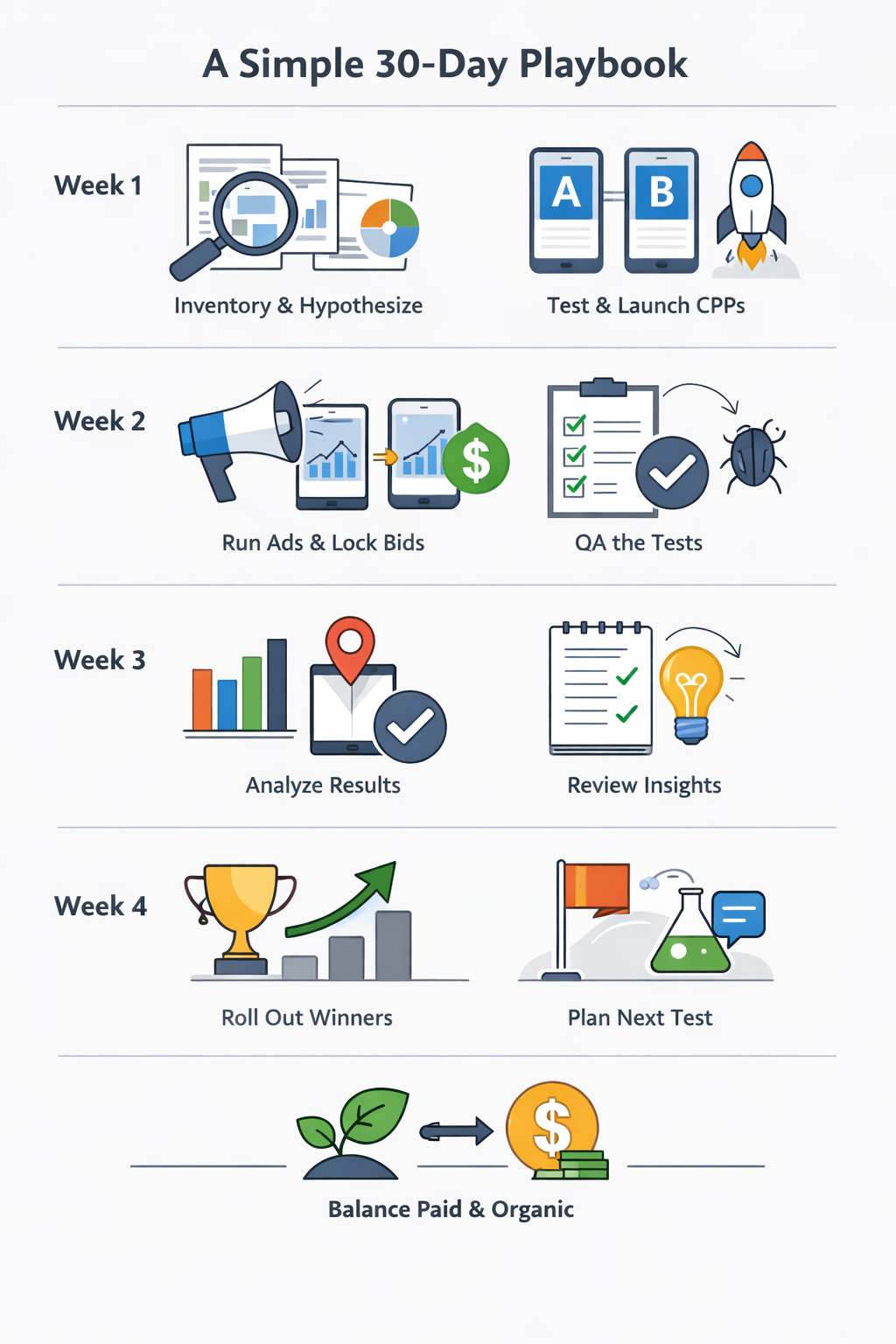
A Simple 30-Day Playbook
In the first few days, inventory your current assets, pull Apple Search Ads (or Play) query data, cluster the top intents, and write crisp hypotheses for each cluster. Pick one primary KPI per surface so decisions don't wobble.
By the end of week one, ship two CPPs for your top cluster and prepare one PPO (or Play) test focused on the first screenshot narrative. In week two, launch ASA ad variations that point to those CPPs and lock bids and budgets. At the same time, start the PPO/Play test with an even split. Mid-run, don't judge. Just QA: data quality, deep-link routing, crashes, and odd traffic swings.
Close in week three. Read ASA by keyword cluster and PPO/Play by locale and device class. Please write down each creative's promise and whether the product experience fulfilled it. In week four, roll out the winners. You can push the better CPP to most traffic in ASA, but keep a challenger lane. Then script the next test based on message insights, not micro-visual tweaks. Sequence paid and organic so they don't trip each other.
A One-Page Report Teams Actually Read
Document each test in a page anyone can scan. State the context (surface, dates, locales, split), the hypothesis (who, what, why), the metric and MDE, the result (effect size, significance, duration), the interpretation (what people responded to and how you know), the decision (roll out, archive, iterate), and the next question the result unlocks. Keep charts minimal and numbers legible.
FAQ
What’s The Difference Between iOS PPO And Custom Product Pages (CPPs), And When Should I Use Each?
PPO is for A/B testing your default App Store product page to improve overall conversion. CPPs are for matching a page to a specific intent or keyword theme, usually for Apple Ads landing pages.
What Is MDE, And How Do I Choose It?
MDE is the smallest conversion lift you care to detect. Smaller MDE means bigger sample and longer tests, so start with changes you expect to move the needle, then refine with smaller tweaks.
How Do I Avoid False Winners In PPO Or CPP Tests?
Avoid stopping early, limit the number of variants, and run tests for a full week cycle at minimum. Use segments to explain results, not to pick winners unless sample sizes per segment are large.
How Do I Keep Paid And Organic From Confounding My Results?
Run PPO while paid inputs stay stable, then test CPPs with Apple Ads while the default page stays fixed. If tests overlap, keep keywords, match types, bids, and budgets consistent and log any changes that could shift traffic mix.
PPO is for A/B testing your default App Store product page to improve overall conversion. CPPs are for matching a page to a specific intent or keyword theme, usually for Apple Ads landing pages.
What Is MDE, And How Do I Choose It?
MDE is the smallest conversion lift you care to detect. Smaller MDE means bigger sample and longer tests, so start with changes you expect to move the needle, then refine with smaller tweaks.
How Do I Avoid False Winners In PPO Or CPP Tests?
Avoid stopping early, limit the number of variants, and run tests for a full week cycle at minimum. Use segments to explain results, not to pick winners unless sample sizes per segment are large.
How Do I Keep Paid And Organic From Confounding My Results?
Run PPO while paid inputs stay stable, then test CPPs with Apple Ads while the default page stays fixed. If tests overlap, keep keywords, match types, bids, and budgets consistent and log any changes that could shift traffic mix.
Conclusion
Success in app-store testing is a rhythm: clear questions, clean execution, honest reads. PPO and Play harden the message everyone sees. CPPs let you speak directly to search intent. Choose MDEs that matter, size tests realistically, and keep paid and organic from confounding each other.
Treat every run, win or not, as a learning step that sharpens the story you tell. After a few cycles, you'll feel the flywheel: faster learning, steadier creative quality, and compounding gains across paid and organic downloads.
Treat every run, win or not, as a learning step that sharpens the story you tell. After a few cycles, you'll feel the flywheel: faster learning, steadier creative quality, and compounding gains across paid and organic downloads.